Two websites, one address —
so humans and AI find you.
Get the site you built cited by Google's results and by ChatGPT's answers.
By the end of today, your site serves two versions.
Same address, same look for your customers — but when ChatGPT, Perplexity, or Google's AI comes to read your site, they get a version built to be quoted. You'll deploy it live, and prove it works, before you leave.
Your normal website — exactly as you built it in Class 1. Nothing about their experience changes.
A clean, fast, answer-first version of every page — no clutter, easy to read, built so an AI can lift a clear quote and cite you.
Same muscle as always: you describe what you want, Claude builds and deploys it, you check the result. Today we point it at getting found.
The groundwork is in. Today we build.
If you did the prerequisites, your domain already runs through Cloudflare and Claude is set up to deploy there — that's why class time is for building, not waiting on DNS.
Your domain is on Cloudflare (Active) — and your live site works exactly like before.
Claude is armed — Cloudflare's official skills installed, your terminal logged in.
1. Build a second, AI-only version of your site.
2. Put a front door in place that serves the right version to each visitor.
3. Deploy it live, prove it works, and set it up to get cited.
Not set up yet? Follow the prerequisites guide — you need your domain on Cloudflare before we can build on it.
AEO didn't replace SEO. It sits on top of it.
You'll hear that SEO is dead — that AEO is the new way and ranking on Google no longer matters. That's flat wrong. The two aren't old-vs-new; they're two links in one chain. SEO gets you found. AEO decides whether you get used. Skip the first and the second never happens.
Search Engine Optimization. ChatGPT and the others don't know your site exists on their own — they discover sources by running Google searches behind the scenes. If you don't rank, you're never in the pool of pages the AI even looks at. Ranking is the price of admission.
Answer Engine Optimization. Now the crawler is reading you. Can it? A page buried in JavaScript, menus, and fluff is hard for it to parse — so it moves on. Serve it clean, answer-first content and it can lift a clear quote and cite you. That's the whole job of the AI version we build today.
(AEO is also called GEO — same idea.) The takeaway: keep doing SEO, it's as important as ever — it's the foundation. Today we add the layer on top: making your site effortless for an AI to read once its search has sent it your way.
Improving SEO, in broad strokes.
SEO is a field of its own and mostly out of scope today — but it's the foundation, so know the two levers that move the needle. Strip the jargon and it's trust: Google ranks the sites other credible sites vouch for, and that clearly know their subject.
A backlink is another site linking to yours — a vote of trust. Relevant beats many: one link from a respected blog in your field outweighs a hundred junk ones. Free ways to earn them:
- Reclaim unlinked mentions — sites already naming you; ask them to link.
- Answer reporters on Connectively / Qwoted / Source of Sources.
- Guest-post one strong piece on a respected niche blog.
- Get listed in real directories — chambers, associations, sponsorships.
- Publish original data — writers cite sources.
EEAT = Experience, Expertise, Authoritativeness, Trust — Google's bar for "does this site know its stuff?" You raise it by proving you do:
- Write from real experience — case studies, specifics only you'd know.
- Show who's behind it — bios, credentials, a real About page.
- Stay on one topic — a focused site reads as an expert.
- Be accurate and current — cite sources, fix what's stale.
- Collect reviews and testimonials — outside validation counts.
- Write it yourself. Google sniffs out AI-generated content and it damages EEAT. Draft with AI, but the ideas and voice must be yours.
Skip the shortcuts that backfire: buying links, keyword-stuffing, thin AI-spun pages. Google is built to catch them, and they drag you down. Slow, real trust is the only kind that lasts.
Have Claude audit your SEO for you.
You don't have to eyeball any of this. There's a free, open-source SEO toolkit that plugs into Claude Code — 25 checkers and 18 specialist agents that crawl your site in parallel and hand back a prioritized, plain-English fix list. This is exactly what I ran on my own site; it was genuinely worth it.
Don't fuss with commands — hand Claude the link and let it install. In Claude Code, paste:
Restart Claude Code when it asks, so the tools switch on — the same restart move from the prereqs.
Open Claude Code in your website project and run them one at a time (swap in your domain):
/seo audit yourdomain.com— the big one: full-site health + fix list./seo content yourdomain.com— your EEAT / content score./seo backlinks yourdomain.com— who links to you, and gaps.
A starter set — there are ~25 in all. Two more (/seo geo, /seo schema) measure the AI surface, so they come after today's build — we'll run them later.
The best part: it doesn't just grade you — Claude can fix what it finds. Run an audit, then say "work through these fixes with me, highest-impact first." Source + docs: github.com/AgriciDaniel/claude-seo.
Cloudflare is the front door — it picks who sees what.
Remember from the prereqs: Cloudflare now sits in front of your website — every visitor hits Cloudflare first, before reaching your actual site. That position is the whole trick. We put a tiny program there — a Cloudflare Worker — that checks who's asking as each request comes through. A human or Google? It passes them to your normal site. An AI crawler? It quietly serves the AI version instead — all at your single address, so the visitor never sees anything different.
This is why we moved your domain to Cloudflare before class: only something sitting in front of your site can intercept every visitor and route them.
The three pieces that make it work.
You don't build these by hand — Claude does. But knowing the three names makes everything Claude tells you legible.
A tiny program running at your address. It reads each visitor and decides: normal site, or AI version. This is the router — the whole trick lives here.
Cloudflare's free file host. It holds the AI version of your pages. The Worker quietly pulls from it — it has its own hidden address the public never sees.
The setting that makes Cloudflare answer for your domain in the first place — which you already did in the prerequisites. That's why the front door can sit out front.
Human site (untouched, wherever it already lives) + AI version (on Pages) + the Worker choosing between them. That's the entire architecture.
The one rule that keeps this safe, not sneaky.
Showing different content to different visitors can be against the rules — it's called cloaking, and Google punishes it. What we're doing is the safe version, and two rules are what keep it that way. Claude enforces both; you just need to know they exist.
Traditional search engines (Google, Bing) are treated exactly like humans — same pages. Only AI crawlers get the AI version. Feeding Google a different page is the cloaking that gets you penalized.
Each AI page carries a signal (a canonical link) saying "the real, original version of me is the human page." That openly tells search engines the two are twins — no hiding, no penalty.
The content is the same on both — the AI version is just cleaner and easier to quote. Same information, openly linked back to its human twin. That's what keeps it above-board.
Use plan mode — let Claude plan before it builds.
Now you know what we're building. For a job this size, don't let Claude charge straight in. Switch to plan mode first: it thinks the whole thing through and hands you a plan to approve — before a single file changes.
Press Shift+Tab to cycle the modes and stop on Plan mode. Describe what you want — Claude proposes, you approve or push back.
Build on the fly and Claude guesses at each step — more mistakes, more time lost debugging. Plan first and it reasons about the whole job up front, so you catch a wrong turn while it's still words on a screen.
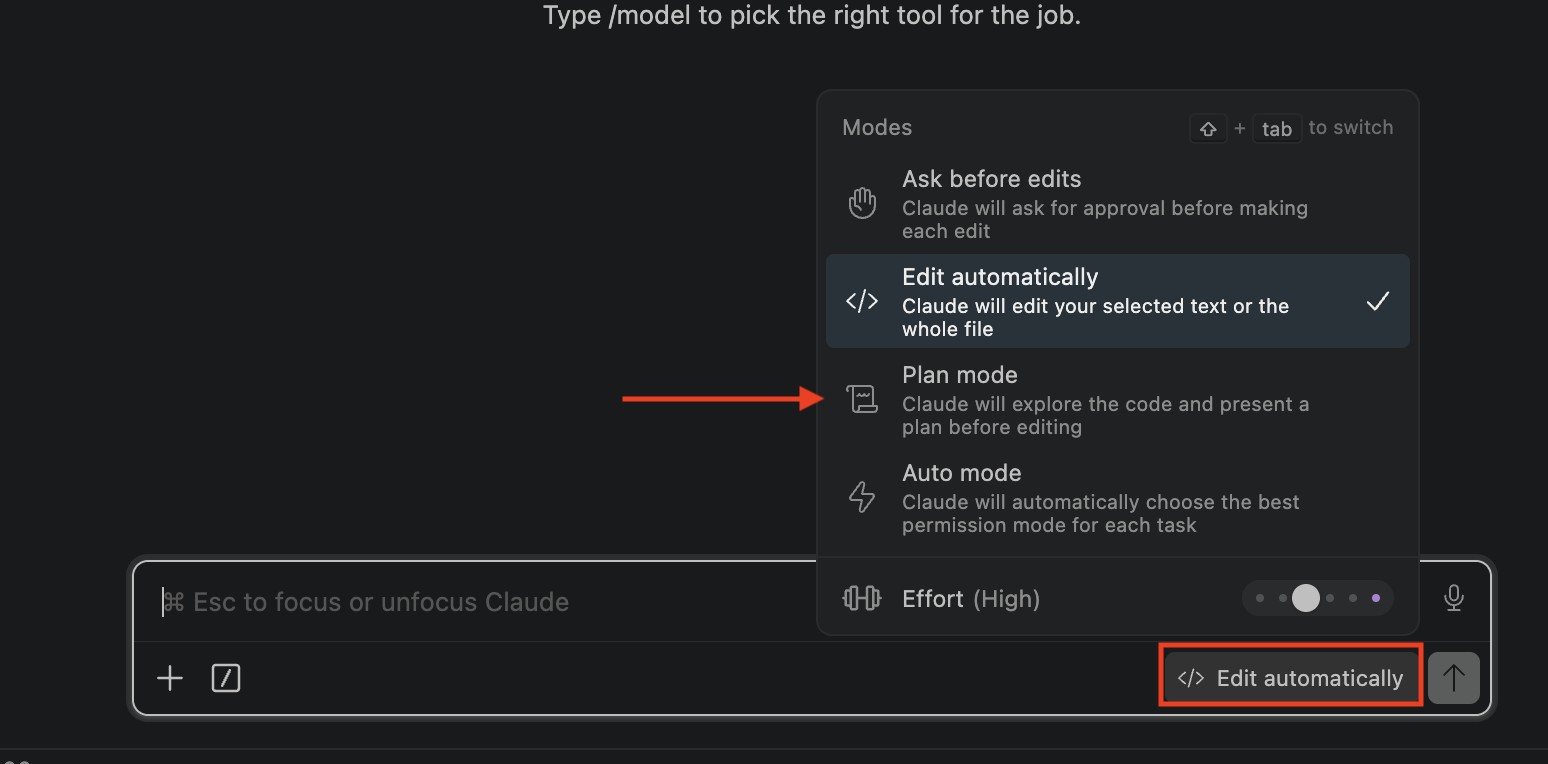
Plans come out technical by default — make Claude write them in plain English. Add "explain it like I'm not technical" to your request, or set that rule once in your CLAUDE.md so every plan is readable — and you can tell if it sounds right before approving.
Reference documents — a Wikipedia for your project.
Claude doesn't remember yesterday's chat. Reference documents are plain files in your project that document how it works — what exists, how it's wired, why it's built that way. Like a Wikipedia for your project: anyone (you, or Claude in a fresh session) can read up and get the full picture — and you get most of them for free.
The plan from plan mode is a reference doc. Claude saves it and works against it to stay on task. No extra effort from you — approving the plan already created it.
When the build is done, have Claude write an architecture doc: how the two surfaces are wired, how the front door decides, what deploys where. This is the one doc worth asking for explicitly.
Pro tip: keep it current automatically. Set a rule in your CLAUDE.md up front — "before every GitHub push, update ARCHITECTURE.md to match what changed" — so the doc never goes stale. Every time you ship, the knowledge base updates itself.
You'll write the architecture doc later — once the site is deployed and proven. For now just know it's coming: next time you open this project, Claude reads it and instantly knows how the two versions fit together.
Plan the whole build with one prompt.
Here's plan mode doing real work. Instead of feeding Claude the build one step at a time, you describe the whole job once and it hands back a plan covering everything. In your website project, switch to plan mode (Shift+Tab) and paste:
Read Claude's plan and sanity-check it before approving. A good plan moves through these four stages, in order:
- 1. Scaffold — set up the empty structure for the bot version of your pages.
- 2. Generate — write the bot pages, following the AEO content guide.
- 3. Deploy — put the pages and the routing front door live on Cloudflare.
- 4. Verify — prove AI, humans, and Google each get the right version.
You're just confirming those four stages are there, and that it's adding a bot version in front of your site, not replacing it. If something looks off, tell Claude and have it re-plan before you approve.
Step 1 — build the shell of the AI version.
You approved the plan, so Claude now works through it — you don't paste anything more. First it mirrors your site's structure: for every page a human can visit, a matching slot for the AI version. It also drops in three small housekeeping files bots expect — Claude handles all of it; here's what they're for.
The rulebook for crawlers — which pages they may visit. Normally a site blocks low-value ones (admin, checkout, search results) so bots don't waste time there. Our bot surface is the opposite: it welcomes every crawler and points to the sitemap.
A list of every page on your site, so crawlers can find them all instead of stumbling around. It points at your real (human) page addresses.
A few safety settings Cloudflare applies to the bot pages — standard security hardening, nothing you configure. Copied straight from the class reference file.
Step 2 — write the AI version of each page.
Now the reason the whole dual-web setup exists. Your human pages are full of stuff a person needs but a bot has to fight through — menus, popups, cookie banners, animations, marketing fluff, and content that only loads after JavaScript runs. The AI version strips all of that away, following the AEO Content Guide: just the answers, in clean, self-contained chunks.
When you ask ChatGPT something, it's racing to answer you fast — so it pulls from sources where the information is quick and easy to extract, and skips the ones it has to dig through. A cluttered page is a page it gives up on.
AI doesn't read your whole page — it lifts the one passage that answers the question. So a page that's already broken into direct, self-contained answers is easy to lift from and cite. That's what the guide's structure engineers for.
And it can go beyond your human pages: since these exist only for AI, you can add more — extra answers and FAQs aimed at the exact questions people ask AI about your business. That ongoing tuning is AEO itself. Claude writes the first pass from the guide — have it show you one example to check.
Step 3 — put it live on Cloudflare.
Now the plan goes live. Claude publishes the AI pages and stands up the front door from the command line — you just approve each time it asks.
The AI pages to Cloudflare Pages, then the routing Worker bound to your domain with a route — the front door goes live in seconds.
Approve when asked. Confirm it's using a route (in front of your site), not replacing it — your human site must keep running the entire time.
One easy-to-miss gotcha: Cloudflare can block AI crawlers by default — so your router deploys fine but the bots never reach it. Claude checks your AI Crawl Control settings as part of the plan and makes sure the crawlers you want are allowed. (The reference files cover this.)
Step 4 — prove both versions are live.
The plan's last step: Claude asks for your site as different visitors and confirms each gets the right version — three checks that together prove it works and that it's cloaking-safe:
- 1. As an AI bot (GPTBot) → should return the clean AI version.
- 2. As a human (a normal browser) → should return your normal site.
- 3. As Google (Googlebot) → must match the human result, not the AI one. This is the cloaking-safety check.
Three different answers, Google matching the human — that's your dual-surface site, live and safe.
Something off? Tell Claude what you saw — it diagnoses and re-runs. This is the same "describe it to Claude" troubleshooting habit from every class.
Steps 1–4 built the machine. Now feed it.
Your AI pages came from existing marketing copy — thin, and aimed at selling, not answering. Now enrich them. The /seo commands only grade; step 2 is the only one that changes anything. The build copied the AEO guide into your project and pointed CLAUDE.md at it — so Claude knows the standard every time, not just today.
/seo content-brief yourdomain.com/page
Checks that page against the top competitors and hands back a brief — the questions and sections you're missing. It edits nothing; it tells step 2 what to write.
No command does this — paste this prompt:
/seo geo yourdomain.com
Scores how citable your live pages are and names the passages to fix. Also just a report — so hand it back: "work through these GEO fixes with me, highest-impact first."
Repeat a few pages a week — that loop is the whole game. Once your full site is converted, run /seo cluster to map every topic worth owning. (Your human pages still need to be genuinely yours.)
Now that it's live, re-run the SEO toolkit.
Remember the free SEO toolkit from earlier (github.com/AgriciDaniel/claude-seo)? Run it again now that the AEO build is live — you ran it on your normal site before, and some of its checks only mean something once the bot surface exists. In Claude Code, run these one at a time (swap in your domain):
/seo geo yourdomain.com— how citable your live pages are to AI (this is the one that needed the build done first)./seo schema yourdomain.com— confirms the structured data the AEO guide put on your bot pages actually landed, and fixes any gaps.
/seo audit yourdomain.com— full-site health + fix list./seo content yourdomain.com— EEAT / content score./seo backlinks yourdomain.com— who links to you, and gaps.
Same deal as before: it doesn't just grade you — Claude can fix what it finds. Run a check, then say "work through these fixes with me, highest-impact first." Make this a habit — re-run it whenever you ship new pages.
Watch the AI crawlers show up.
Once you're live, Cloudflare shows you which AI crawlers are visiting and how often — real proof the AI version is being read. It's the same idea as the Class 2 dashboard, but for bots.
In Cloudflare's AI Crawl Control (in your dashboard): which bots visit — GPTBot, ClaudeBot, PerplexityBot — and how often. Rising visits mean the AI world is discovering you.
Ask the AIs about your topic yourself. Over the weeks ahead, do they start mentioning you? That's AEO working — being in the answer.
Ask Claude any time: "which AI crawlers have hit my site lately, and how often?" — it can pull the numbers straight from Cloudflare.
Want to speed it up? A paid lever for AI visibility.
Everything so far is free and organic. If you have a budget and want to accelerate, there's a paid angle that's turned out to matter for AI search specifically: getting your brand mentioned in premium media. Tools like Linkby make that reachable without a PR agency — but treat it as an experiment, not a guarantee.
LLMs don't rank links like Google — they read the web for context and authoritative brand mentions, and they ignore the "nofollow" tag that normally blocks SEO credit. So a mention in several high-tier publications trains the model to see you as a trusted name in your category — exactly what gets you into AI answers.
Performance PR, pay-per-click. You write a short brief; real publishers opt in and write editorial coverage; you pay only when someone clicks through (you set the budget and the per-click price). No agency retainer, no upfront spend — and a Google "halo" bonus when that coverage ranks and sends you real traffic.
Set expectations honestly: this is a paid experiment with no guaranteed outcome — AI visibility is influenced, not bought. Start with a small budget, see if mentions and citations tick up, and only scale if they do. The free work you did today is the foundation; this is an optional boost on top.
Track your SEO + AEO in your Class 2 dashboard.
You just changed how your site gets found — now you need to see whether it's working. Your homework: add an SEO + AEO tracker to the dashboard you built in Class 2. The sooner you build it, the sooner it starts collecting data — and trends only show up over weeks, so starting now matters.
Rankings, AI citations, and crawler visits all move slowly. If you wait a month to start tracking, you've lost a month of the "before vs. after" story. Get it collecting this week so you can watch the difference this build makes.
To pull real ranking + keyword data, you'll connect DataForSEO (dataforseo.com) — a pay-as-you-go SEO data API. It takes a ~$50 prepaid minimum to start, but each lookup costs fractions of a penny — so $50 lasts a very long time. Claude connects it as an MCP server, just like Supabase in Class 2.
No step-by-step this time — you've got the tools. You know plan mode, MCP servers, the dashboard, and how to point Claude at what you need. Tell Claude what you want to track (rankings, AI crawler hits, citations over time) and build it the same way you've built everything else. This is you doing it on your own.
You built a site that gets found both ways.
- A second, AI-optimized version of your site, live on Cloudflare.
- A front door serving humans your site and AI crawlers the quotable version — safely, no cloaking.
- Structured data on every bot page, so AI understands and quotes you accurately.
- A way to watch the AI crawlers arrive in Cloudflare.
The upkeep is tiny: whenever you add or change a page on your human site, just tell Claude — "update my bot pages to match" — and it re-generates and re-deploys the AI version. The front door and everything else keeps running.
Next class builds on this same site again. Every class ships something live — and today you shipped your reach.